💻 CLI & TUI
ZooCache includes a Terminal User Interface (TUI) for real-time monitoring and cache management.
CLI Installation
The CLI is an optional extra. Install it with:
Running
To start the visual interface, you need a Redis URL to connect to your ZooCache instance:
# Using command line argument
zoocache cli --redis redis://localhost:6379

# Or using environment variable
export REDIS_URL=redis://localhost:6379
zoocache cli

# Alternative alias
zoocache dashboard --redis redis://localhost:6379
uv run zoocache cli --redis redis://localhost:6379 if not in your PATH)
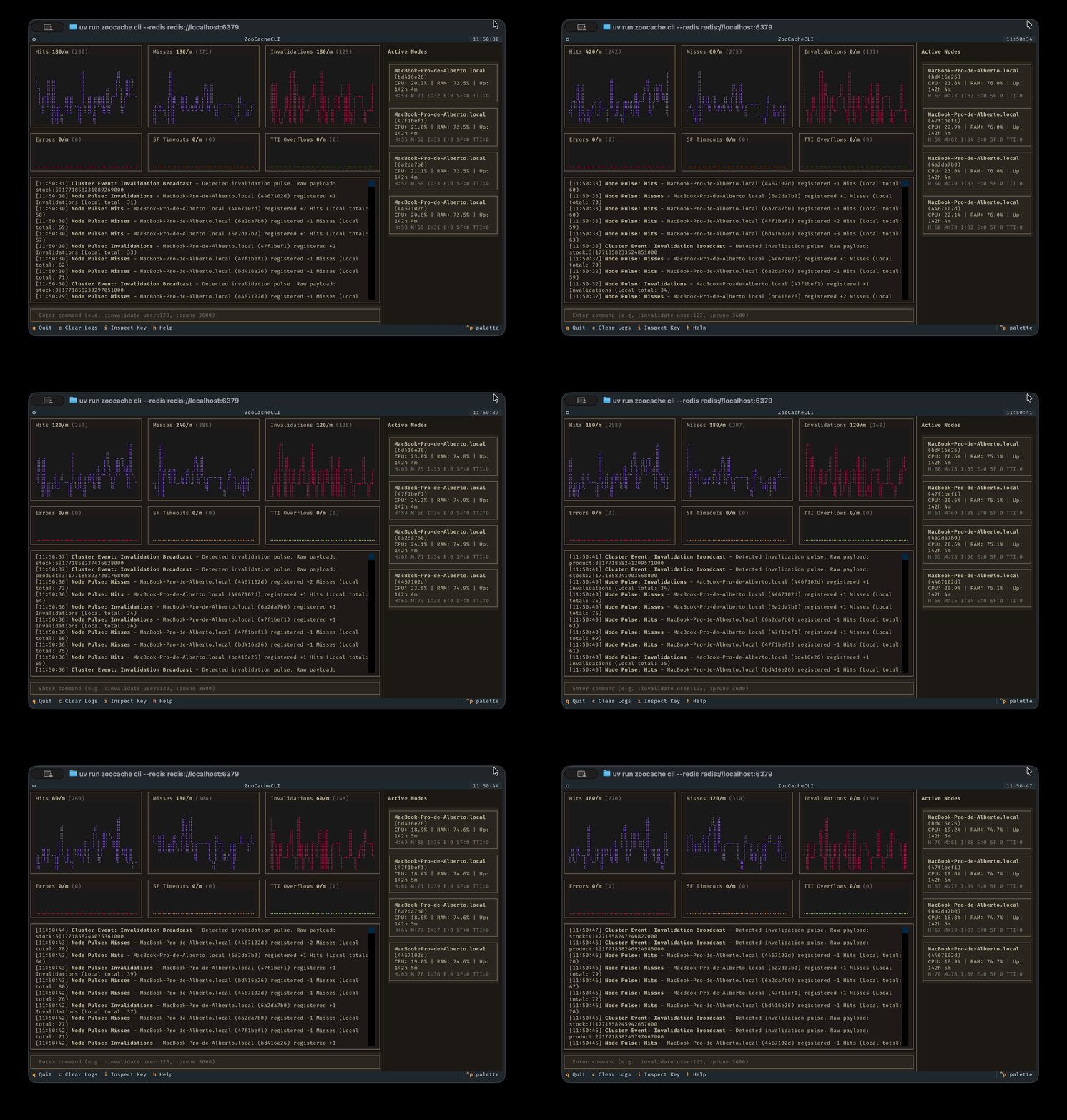
TUI Features
- Metrics: Visualize hit rates, latencies, and memory usage.
- Trie Explorer: Visually navigate the hierarchy of invalidation tags.
- Live Commands: Execute commands directly against cache nodes.
Targeted Commands
The TUI allows executing commands against specific nodes using the syntax:
Where [target] can be:
- all: All active nodes (default).
- local: Only the node where you are running the CLI.
- node_id: A specific node identifier.
Examples:
- all clear: Clears the cache on all nodes.
- local prune 3600: Prunes the local cache of items older than 1 hour.
- node_xyz invalidate user:42: Invalidate user:42 specifically on node node_xyz.